
Download Cool Previews – website preview, link preview, Firefox extension, online safety, browsing tool
Overview
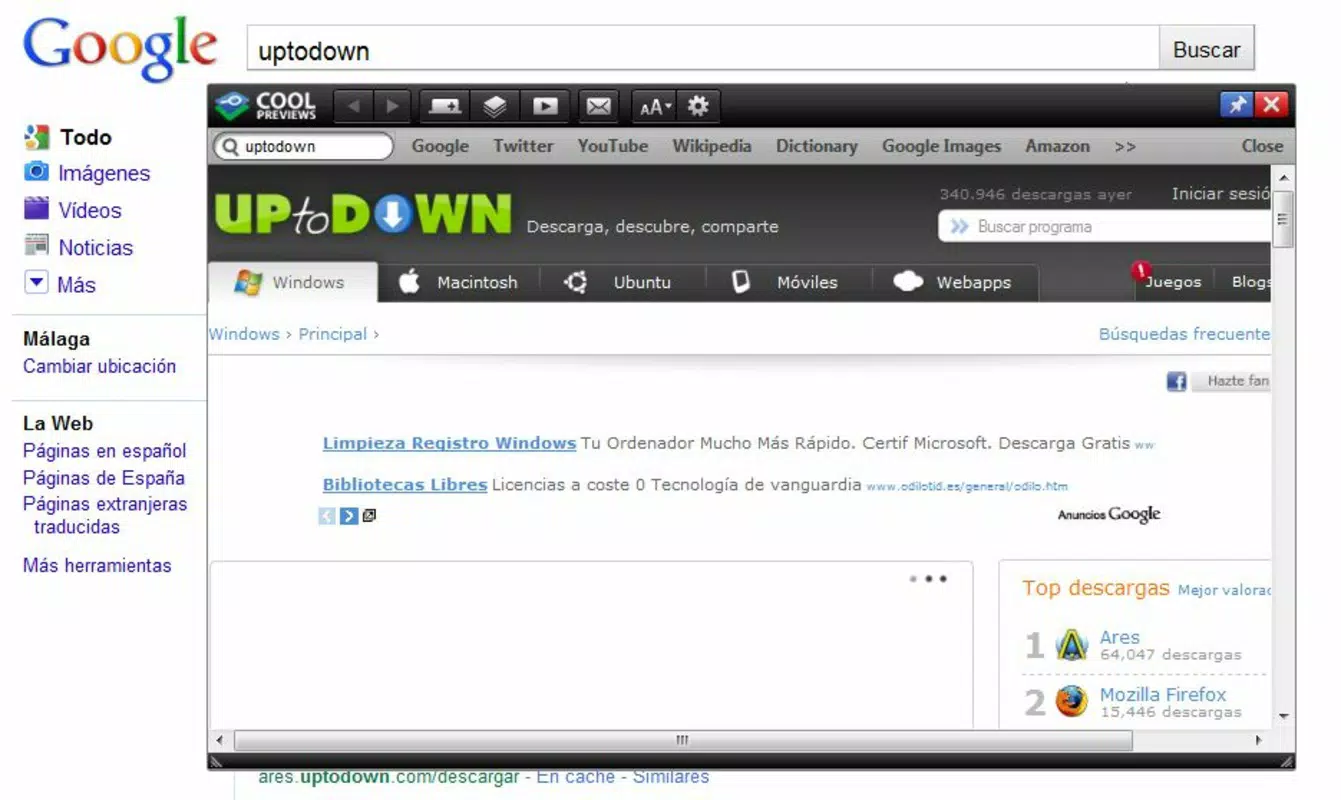
Cool Previews is a lightweight Firefox extension designed to enhance online browsing safety and efficiency by enabling users to preview websites before clicking on links. The tool operates by displaying a quick snapshot of a webpage when a user hovers over a hyperlink, allowing for immediate assessment of content and legitimacy. This functionality is particularly valuable for individuals seeking to avoid malicious or misleading websites, especially when encountering unfamiliar links in emails, social media, or news articles.
Target users include privacy-conscious internet users, professionals managing high volumes of online information, and anyone concerned about accidental exposure to phishing attempts or harmful content. The extension supports a proactive browsing approach, promoting digital safety through informed decision-making. Although it is not a mobile application, its purpose aligns with broader trends in browser-based productivity and security tools.
Developed by Thomas P. Larson, the extension has been available since 2012, reflecting a long-standing commitment to user-centric design. Despite its age, the tool continues to serve a niche but important role in the Firefox ecosystem. Its simplicity and focus on core functionality have contributed to its enduring relevance. The developer did not provide additional technical details about updates or future development plans.
Key Features & Functionality
- Instant Website Preview: Users can view a real-time visual preview of a webpage by hovering over any link. The preview activates within a second, offering a snapshot of the site’s layout and content without requiring full navigation.
- Safety from Malicious Links: By allowing users to inspect a site’s appearance before clicking, Cool Previews reduces the risk of encountering phishing pages, malware distribution sites, or deceptive content.
- User-Friendly Interface: The extension features a minimal, non-intrusive design. A small preview window appears seamlessly upon hover, requiring no configuration or learning curve.
- Compact Display Format: The preview window is intentionally small and focused, displaying only essential visual elements to avoid cluttering the browser interface.
- Non-Interactive Preview: While users can view content snippets, the preview does not support full navigation or interaction. This limitation ensures the tool remains lightweight and focused on assessment rather than browsing.
Real-world use cases include verifying the authenticity of links in promotional emails, checking news article sources before reading, or evaluating the credibility of external references in online discussions. The extension is especially useful in environments where digital security is paramount, such as remote work or academic research.
Interface, UX & Performance
Cool Previews maintains a clean and unobtrusive interface that integrates smoothly with the Firefox browser. The preview window appears directly above or beside the hovered link, using a transparent overlay to minimize visual disruption. Navigation within the extension is intuitive—users simply hover to activate and move the cursor away to dismiss the preview.
The user experience is optimized for speed and simplicity. There are no settings to configure, no pop-ups, and no additional permissions required. The extension does not alter the browser’s default behavior, making it accessible to users of all technical levels. Although the developer did not list formal performance metrics, the small file size of 48.9 KB suggests minimal impact on system resources.
Performance on different device categories is not formally documented. However, given its lightweight nature and focus on static previews, it is expected to function consistently across standard desktop and laptop systems. Responsiveness is maintained through direct browser integration, ensuring quick activation and smooth dismissal of previews. Stability appears reliable based on long-term usage, though compatibility with future Firefox versions remains uncertain due to the lack of recent updates.
Platform Compatibility & Technical Requirements
Cool Previews is specifically designed for the Firefox browser and is not available on mobile platforms. The extension requires Firefox as the operating environment, though specific minimum OS requirements were not listed. The current version is 1.1.2, with a file size of 48.9 KB, indicating a highly compact and efficient design.
Compatibility information was not fully disclosed. Users should be aware that the extension has not been updated since 2012, which may affect its functionality with newer versions of Firefox. While it may still work on current Firefox installations, there is no guarantee of full compatibility. The developer did not specify whether future updates are planned.
Pros and Cons
Pros
- Lightweight design with minimal system impact (48.9 KB)
- Simple, intuitive interface with no learning curve
- Enhances online safety by enabling pre-click inspection of links
- Quick activation via hover—no additional steps required
- Non-intrusive preview window preserves browser space
Cons
- Not updated since 2012—potential compatibility issues with modern Firefox versions
- Does not support full browsing within the preview window
- Only available for Firefox—no support for other browsers or mobile platforms
- Developer did not provide update or support information
- Limited functionality compared to modern browser tools
FAQ
Is Cool Previews safe to install?
Yes, the extension is free and open to download. It does not require access to sensitive data or personal information. However, due to its age, users should ensure their Firefox version is compatible before installation.
Can I use Cool Previews on mobile devices?
No, Cool Previews is designed exclusively for the Firefox desktop browser. It is not available for Android or iOS platforms.
Does Cool Previews work with all websites?
It works with most standard websites that render visible content. However, some dynamic or heavily protected sites may not display properly in the preview.
Is Cool Previews free to use?
Yes, the extension is completely free. There are no in-app purchases or subscription fees.
Will Cool Previews slow down my browser?
Due to its small size and minimal functionality, it is unlikely to impact browser performance. The extension uses minimal system resources and operates efficiently.
Final Thoughts
Cool Previews remains a niche but valuable tool for users who prioritize safe and efficient browsing. Its ability to deliver instant website previews with minimal overhead makes it a practical addition for anyone looking to reduce the risk of encountering harmful content. While its lack of recent updates raises concerns about long-term compatibility, its core functionality continues to serve a meaningful purpose in the digital landscape.
For users still on older Firefox versions or those who value simplicity over advanced features, Cool Previews offers a reliable, no-frills solution. It stands out as a testament to the enduring value of focused, lightweight tools in an era of increasingly complex software.
Download Cool Previews now


